Data Leak Prevention: How to Stop Sensitive Data from Leaking to AI Tools
Complete guide to preventing data leaks when using AI tools. Learn about PII redaction, API key protection, and client-side sanitization strategies.
Data Leak Prevention: How to Stop Sensitive Data from Leaking to AI Tools
In 2026, AI tools like ChatGPT, Claude, and Gemini process billions of user inputs daily. While these tools boost productivity, they also create unprecedented data leak risks. A single accidental paste can expose customer PII, corporate secrets, or API keys to the wrong people—or worse, make them part of AI training data forever.
This comprehensive guide covers everything you need to know about data leak prevention for AI tool usage: the risks, the real-world consequences, and the practical strategies that keep your sensitive data safe.
The Scale of the Problem: AI Data Leaks in 2026
Startling Statistics
- 62% of organizations had employees paste sensitive data into AI tools without authorization
- $4.88 million average cost of a data breach in 2026
- $82,000 in charges from a single leaked API key (a startup's near-bankruptcy)
- 5,000+ GitHub repositories found leaking API keys to AI tools
- 3,000+ live production websites exposing Google API keys that now grant Gemini access
High-Profile Incidents
Samsung Semiconductor Leak (2023): Engineers used ChatGPT to translate semiconductor manufacturing data. That proprietary information potentially became part of OpenAI's training corpus. Samsung banned all generative AI tools company-wide.
The $82,000 API Key Mistake (2026): A startup's Google Cloud API key was stolen and used to access Gemini AI. The attackers ran up $82,000 in charges in 48 hours. The key had been embedded in client-side code for a Maps integration—considered "harmless" until Google enabled Gemini API access.
The Accidental Database Paste: A developer debugging a production issue pasted error logs containing customer data into an AI assistant. The AI subsequently generated similar data patterns in responses to other users, exposing personal information.
Understanding the Attack Surface: How Data Leaks to AI
The Data Flow Problem
When you paste data to an AI tool, here's what typically happens:
Your Device → AI Provider's Servers → Processing → Storage (potentially)
                  ↓
         May be used for:
         - Model training
         - Human review
         - Debugging
         - Legal compliance
         - Third-party services
At each step, your data is:
- Transmitted over networks (interceptable)
- Stored temporarily (potentially logged)
- Processed by third parties (expanded attack surface)
- Potentially retained (unknown duration)
Common Leak Vectors
1. Accidental Pasting
The most common cause: employees copy-pasting sensitive data without realizing it. Debug logs, error messages, customer emails—all can contain sensitive information that's pasted before thinking.
2. Auto-Complete and Clipboard
Modern tools make copying easy—and dangerous. Auto-complete suggestions can include sensitive data. Clipboard history can retain sensitive information longer than expected.
3. Context Blindness
Employees often don't recognize what's sensitive. A database error message looks like "just technical stuff" to most people—but it may contain customer emails, IPs, or connection strings.
4. Third-Party Integrations
AI tools integrated with other services (email, Slack, CRM) can pull in sensitive data from connected systems without users realizing.
5. Training Data Exposure
Even if AI providers claim not to train on your data, the risk remains. Data may be used for safety monitoring, debugging, or compliance purposes—and those systems may have vulnerabilities.
The 7 Categories of AI Data Leaks
1. Customer PII Leaks
What's at risk: Names, emails, phone numbers, addresses, government IDs, financial information
Consequences:
- GDPR, CCPA, HIPAA violations
- Regulatory fines (up to 4% of global revenue for GDPR)
- Reputational damage and customer trust loss
- Identity theft and fraud affecting customers
Example leak: A customer support ticket containing SSN and bank details gets pasted to an AI for "help drafting a response." That data is now on AI provider servers.
2. API Key and Credential Leaks
What's at risk: AWS keys, Stripe keys, Google Cloud keys, GitHub tokens, database passwords, OAuth tokens
Consequences:
- Unauthorized access to cloud infrastructure
- Financial fraud (payment processing keys)
- Data breach from compromised databases
- Cryptocurrency mining on your servers
- Unexpected charges (often in the tens of thousands)
Example leak: A developer pastes a log file containing AKIAIOSFODNN7EXAMPLE to debug an AWS error. Attackers scraping AI inputs find the key and compromise the account.
3. Intellectual Property Leaks
What's at risk: Source code, trade secrets, product roadmaps, competitive analysis, proprietary algorithms
Consequences:
- Competitive intelligence shared with competitors
- Loss of patent rights (public disclosure)
- Market advantage erosion
- Legal disputes over ownership
Example leak: A product manager pastes a confidential feature roadmap into an AI to "get feedback on strategy." The roadmap becomes part of training data that competitors might access.
4. Financial Data Leaks
What's at risk: Credit card numbers, bank accounts, transaction histories, financial projections, pricing strategies
Consequences:
- PCI-DSS violations
- Direct financial fraud
- Insider trading implications
- Competitive intelligence loss
Example leak: A finance team member pastes a spreadsheet with customer payment details into an AI to "help categorize expenses." Card numbers are now on external servers.
5. Healthcare Information Leaks
What's at risk: Patient records, medical IDs, diagnosis codes, prescription information, health insurance details
Consequences:
- HIPAA violations (up to $1.5 million per violation type per year)
- Criminal penalties
- Patient trust destruction
- Reputational damage to healthcare providers
Example leak: A nurse pastes patient notes into an AI to "help document a case." Protected health information is now outside the HIPAA-covered entity.
6. Authentication Token Leaks
What's at risk: JWT tokens, session IDs, OAuth bearer tokens, API tokens
Consequences:
- Session hijacking
- Unauthorized access to connected systems
- Lateral movement through connected services
- Account takeover
Example leak: A developer pastes an error log containing a JWT to debug authentication issues. The token is valid for 24 hours—attackers can impersonate the user until it expires.
7. Infrastructure Mapping Leaks
What's at risk: Internal IPs, private hostnames, cloud resource identifiers, network architecture
Consequences:
- Reconnaissance for targeted attacks
- Lateral movement planning
- Vulnerability identification
- Tailored attack development
Example leak: Error logs revealing prod-db-01.internal, 192.168.1.0/24, and arn:aws:ec2:us-east-1:123456789:instance/i-abc123 give attackers a complete map of your infrastructure.
The Data Leak Prevention Framework
Layer 1: Prevention (Keep Data from Reaching AI)
Client-Side Redaction
Use browser-based tools that detect and redact sensitive data before it leaves your device. PasteShield and similar tools process data locally—no sensitive information ever reaches AI provider servers.
Clipboard Monitoring
Implement clipboard monitoring that automatically flags or sanitizes sensitive patterns before pasting. This can catch accidental exposure before it happens.
Pre-Paste Review Prompts
Training and prompts that remind users to review clipboard content before pasting. "Was this data sanitized?" becomes a reflex.
Layer 2: Detection (Identify Leaks Quickly)
AI Provider Notifications
Some AI providers offer enterprise plans with data handling guarantees and breach notifications. Know what your provider offers.
DLP Solutions
Enterprise Data Loss Prevention (DLP) tools can monitor for sensitive data patterns and alert or block attempts to paste to AI tools.
User Behavior Analytics
Monitor for unusual patterns—like employees suddenly using AI tools more frequently or pasting unusual content types.
Layer 3: Response (Minimize Damage When Leaks Occur)
Key Rotation Procedures
Have documented procedures for immediately rotating any API keys, passwords, or tokens that may have been leaked. Time is critical—rotate before attackers can exploit.
Breach Notification
Understand your legal obligations for data breach notification. GDPR requires 72-hour notification in some cases. Know the timelines and procedures.
AI Provider Contact
Know how to contact AI providers if you suspect a leak. Some may be able to purge data from recent processing or provide logs of what was retained.
Practical Data Leak Prevention Strategies
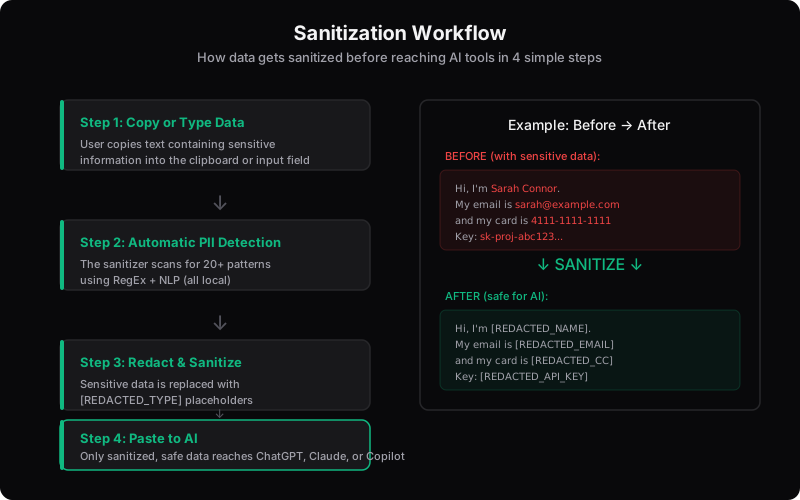
Strategy 1: The Sanitization First Approach
Make data sanitization a mandatory step before any AI interaction:
- Copy content to clipboard
- Paste to sanitization tool (PasteShield or similar)
- Review automated redactions
- Add any manual redactions
- Copy sanitized content
- Paste sanitized content to AI
Pros: Comprehensive protection, works with any AI tool, no AI provider changes needed
Cons: Adds a step to workflow, requires user discipline
Strategy 2: Approved AI Tool Selection
Use AI tools designed for enterprise data handling:
- Microsoft Copilot: Data stays within Microsoft's compliance framework
- Enterprise AI plans: Many providers offer business tiers with better data handling
- On-premise AI: For highly sensitive data, run AI locally
Pros: Provider-managed compliance, simpler user workflow
Cons: Limited to specific tools, may not have all AI capabilities
Strategy 3: Policy and Training
Combine technical controls with organizational policies:
- Clear AI usage policies defining what's allowed
- Regular training on data sensitivity and AI risks
- Regular audits of AI usage patterns
- Incident response procedures for accidental leaks
Pros: Addresses human factors, builds culture of security
Cons: Relies on human compliance, doesn't prevent all accidents
Strategy 4: Hybrid Approach (Recommended)
Combine multiple strategies for defense in depth:
- Establish clear policies and train employees
- Provide approved AI tools for appropriate use cases
- Deploy client-side sanitization as an additional layer
- Implement DLP monitoring for sensitive data patterns
- Have response procedures ready for incidents
Pros: Multiple layers of protection, addresses different risk vectors
Cons: More complex to implement and maintain
The Client-Side Sanitization Deep Dive
Client-side sanitization is the most practical layer for most organizations. Here's how it works:
How Client-Side Tools Protect Your Data
User copies text with sensitive data
        ↓
Text processed in browser (JavaScript)
        ↓
Patterns detected (RegEx) and entities recognized (NLP)
        ↓
Sensitive data replaced with placeholders
        ↓
Sanitized text ready for clipboard
        ↓
User pastes sanitized text to AI
        ↓
AI only sees sanitized content
        ↓
Sensitive data never left user's device
What Client-Side Tools Should Detect
A comprehensive PII redaction tool should detect:
- Names (via NLP)
- Organizations (via NLP)
- Locations (via NLP)
- Email addresses
- Phone numbers (international formats)
- Credit cards and CVV
- SSN and government IDs
- AWS keys
- Stripe keys
- Google Cloud keys
- GitHub tokens
- Generic passwords and secrets
- IP addresses (IPv4 and IPv6)
- JWT tokens
- Private keys and certificates
- Database connection strings
- Internal hostnames
- UUIDs (potential record identifiers)
Evaluating Client-Side Sanitization Tools
When choosing a tool, verify:
- Detection coverage: How many sensitive patterns does it detect?
- Processing location: Is data processed in your browser or sent to servers?
- Accuracy: Low false positive and false negative rates?
- Performance: Fast enough for real-time use?
- Transparency: Can you verify the tool isn't sending data?
- Maintenance: Is it actively updated for new patterns?
Building an AI Data Leak Prevention Program
Phase 1: Assessment (Week 1-2)
- Identify AI tools currently in use (approved and unapproved)
- Classify data types that might be shared with AI
- Assess current security controls and gaps
- Evaluate client-side sanitization tools
Phase 2: Foundation (Week 3-4)
- Establish AI usage policies
- Deploy approved tools or client-side sanitization
- Begin employee training
- Configure DLP monitoring if applicable
Phase 3: Operational (Week 5+)
- Monitor AI usage patterns
- Refine policies based on real usage
- Provide ongoing training
- Update sanitization patterns as needed
- Conduct regular audits
FAQ: Data Leak Prevention for AI
Q: Can't AI providers just promise not to use my data?
They can promise, but promises don't eliminate risk. Data may still be processed for safety monitoring, debugging, or legal compliance. Additionally, AI providers have been breached—any data on their servers is potentially at risk. Client-side sanitization eliminates the root cause of the risk.
Q: Is it okay to use AI tools if I don't share customer data?
That depends on your data. Even internal data can be sensitive: source code, proprietary algorithms, strategic plans, and internal communications. Treat all non-public information as potentially sensitive.
Q: What about anonymized data?
Studies show that 87% of Americans can be identified with just ZIP code, gender, and date of birth. Most "anonymized" datasets aren't truly anonymous. If the AI doesn't need the data, don't share it.
Q: Are there AI tools safe enough for sensitive data?
Some enterprise tools have strong data handling commitments, but no tool is 100% safe. Client-side sanitization provides an additional layer of protection regardless of which AI tool you use.
Q: How do I balance AI productivity with data security?
Use a layered approach: policies for awareness, approved tools for common cases, client-side sanitization as a safety net. Productivity suffers more from data breaches than from security measures.
Conclusion: Prevention Is the Only Cure
Data leaks to AI tools are preventable. The key is understanding the risks, implementing multiple layers of protection, and making data sanitization a reflex rather than an afterthought.
The most practical starting point for most organizations: deploy client-side sanitization tools. They work with any AI tool, add minimal friction to workflows, and provide comprehensive protection against accidental data exposure.
Combined with clear policies, employee training, and response procedures, you can enable your team to use AI tools productively while keeping sensitive data safe.
Your data's security is in your hands. Don't let a single accidental paste undo years of trust-building with customers and partners. Sanitize first, paste with confidence.
Found this guide helpful?
Share it with your team to spread AI privacy awareness.