How to Sanitize Data for ChatGPT: Complete 2026 Guide
Learn how to safely paste sensitive data to ChatGPT without leaking PII, API keys, or passwords. Client-side redaction explained.
How to Sanitize Data for ChatGPT: The Complete 2026 Guide to AI Prompt Privacy
Every week, another company makes headlines for accidentally leaking sensitive data to AI tools. In 2023, Samsung engineers paste-translated semiconductor manufacturing data into ChatGPT, only to watch that proprietary information become part of OpenAI's training corpus. Apple, JPMorgan, Amazon, and dozens of other Fortune 500 companies have since banned AI tools outright due to data privacy concerns.
The irony is painful: we're trying to boost productivity with AI, but our own habits are creating catastrophic security liabilities. A single accidental paste of an AWS access key, Stripe API key, or customer database can lead to data breaches, financial losses, and regulatory violations.
Here's the good news: you don't have to choose between productivity and security. This guide teaches you how to sanitize data for ChatGPT properly—protecting your PII, financial information, API keys, and corporate secrets while still leveraging AI's full potential.
Why You Can't Just "Delete" Data Before Pasting to AI
Let's get something straight right now: deleting data and masking data are not the same thing.
When you delete a name from your text, you might replace it with [NAME REMOVED]. But here's what the AI sees: a signal that says something important was here, but now it's gone. That's still information leakage—the AI knows you're hiding something, which can bias its outputs or prompt further probing.
What you actually want is context-preserving masking. Instead of removing a name entirely, replace it with a consistent placeholder like [PERSON_1]. The AI still understands that a person exists in the context, but doesn't know who they are. This preserves the analytical value of your data while maintaining complete privacy.
[REDACTED_AWS_KEY] to prevent infrastructure mapping and reverse-engineering.
The 7 Categories of Data You Must Sanitize Before Pasting to AI
Whether you're using ChatGPT, Claude, Gemini, Copilot, or any other AI tool, these categories of data require mandatory redaction:
1. Personally Identifiable Information (PII)
This includes names, addresses, phone numbers, email addresses, and government IDs. In Australia, this critically includes TFNs (Tax File Numbers) and Medicare card details. In the US, Social Security Numbers (SSN) are especially sensitive. Even partial information can be used for identity theft or social engineering attacks.
2. Financial Data
Credit card numbers (even partial), transaction IDs, bank account details, CVV codes, and expiry dates. The PCI-DSS compliance requirements treat even a single credit card number as sensitive data that requires protection.
3. Network Infrastructure
Internal IP addresses (10.x.x.x, 192.168.x.x, 172.16-31.x.x), server hostnames, database connection strings, internal URLs, and AWS resource identifiers. This information allows attackers to map your infrastructure and plan lateral movement.
4. Developer Secrets
API keys, hardcoded passwords, environment variables, database credentials, private keys, SSH keys, and authentication tokens. AWS access keys are particularly dangerous—one leaked key can compromise your entire cloud infrastructure. Stripe keys can lead to financial fraud. GitHub tokens can expose source code and repositories.
5. Authentication Credentials
JWT tokens, Slack tokens, Discord tokens, OAuth bearer strings, and session identifiers. These can be used for session hijacking and unauthorized access to connected services.
6. Healthcare Information
Medical record numbers, patient IDs, prescription details, and health insurance information. In the US, this falls under HIPAA regulations. In Australia, the Privacy Act covers health information. Violations can result in massive fines.
7. Corporate Intellectual Property
Project codenames, client names, internal product names, pricing strategies, competitive analysis, and confidential communications. This information can give competitors unfair advantages or reveal trade secrets.
The Step-by-Step Data Sanitization Workflow
Follow this workflow every time before pasting anything to an AI tool:
Step 1: Identify
Before typing anything into an AI tool, do a mental scan. What categories of sensitive data might be in this text? Look for:
- Email addresses (especially in logs or error messages)
- Phone numbers in various formats
- IP addresses (IPv4 and IPv6)
- API keys with prefixes like
sk_live_,AKIA,AIza - UUIDs that might identify specific records
- Database connection strings
Step 2: Sanitize
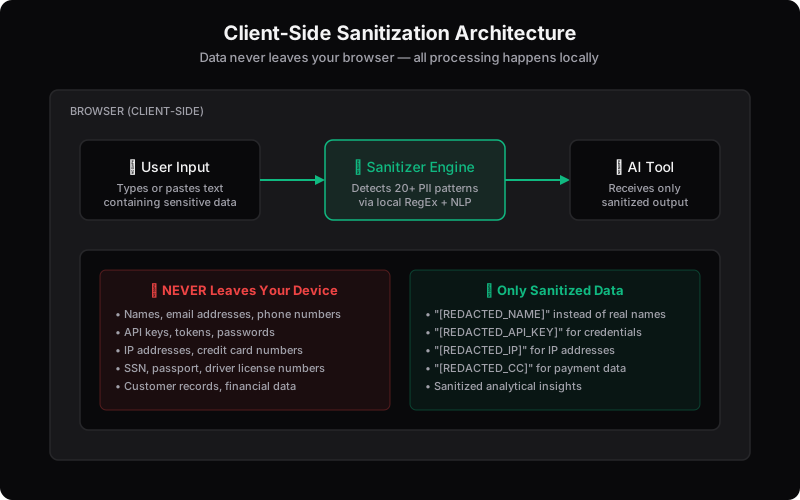
Use a client-side PII redaction tool like PasteShield to automatically detect and mask 20+ types of sensitive data. The tool should recognize:
- Names and organizations (via NLP)
- Emails, phones, addresses
- Credit cards, CVV, expiry dates
- API keys (AWS, Stripe, Google, GitHub, Slack, Discord)
- Private keys and SSH keys
- JWT tokens
- Internal hostnames and IPs
- Generic password patterns
Step 3: Verify
Review the sanitized output. Does it still make sense? Can the AI understand the context without knowing the specifics? Look for any patterns you might have missed—sometimes sensitive data appears in unexpected places.
Step 4: Paste and Prompt
Only now are you ready to use the AI. Your sanitized data preserves the analytical value while protecting sensitive information.
Why Client-Side Processing Is Essential for AI Privacy
When you send data to a server for cleaning, you're creating a new attack surface. That server needs to receive your data, process it, and return results—which means your sensitive information:
- Traverses networks and can be intercepted
- Gets logged by the processing server
- May be stored temporarily for processing
- Could be part of error logs or monitoring systems
Client-side processing eliminates all of this. When a redaction tool runs in your browser using JavaScript, your data literally never leaves your device. This is sometimes called "zero-knowledge sanitization"—the server never sees your sensitive data.
Real-World Case Studies: When Sanitization Fails
Case Study 1: The $82,000 API Key Mistake
In February 2026, a startup had their Google Cloud API key stolen after it was accidentally exposed. Attackers used it to access Gemini AI and ran up $82,000 in charges in just 48 hours. The key had been embedded in client-side code for a Google Maps integration—a "harmless" use case that became catastrophic when Google enabled Gemini API access.
Case Study 2: Samsung Semiconductor Leak
Samsung engineers used ChatGPT to translate semiconductor manufacturing data. Within weeks, that proprietary information was part of OpenAI's training corpus. Samsung responded by banning all AI tools company-wide and implemented strict data handling policies.
Case Study 3: The Accidental Database Paste
A developer debugging a production issue pasted an error log containing customer data into an AI coding assistant. The AI subsequently generated similar data patterns in responses to other users, exposing personal information to unrelated parties.
FAQ: Your Burning Questions About AI Data Sanitization
Q: Can ChatGPT see my deleted history?
As of 2026, ChatGPT retains conversation history unless you explicitly delete it. Even then, OpenAI may retain anonymized or aggregated data for training purposes. Always assume anything you paste could be stored long-term.
Q: Does masking data make AI less accurate?
It can, if you do it poorly. Context-preserving masking maintains the AI's ability to understand relationships and patterns while removing identifying specifics. For example, replacing "John Smith" with "[PERSON_1]" keeps the name recognizable as a person without revealing identity.
Q: What's the best free tool to redact PII for AI?
PasteShield. It's 100% client-side (data never leaves your browser), detects 20+ types of sensitive data including names, emails, API keys, IP addresses, and more, and costs exactly zero dollars.
Q: Can I use regular expressions (RegEx) to redact data?
RegEx is great for known formats like emails ([a-z]+@[a-z]+.[a-z]+) and phone numbers, but it struggles with context-dependent data like names and organizations. Modern tools combine RegEx for pattern matching with NLP for intelligent entity recognition.
Q: What about AI that claims to "forget" my data?
Even if AI providers claim to not train on your data, they may still process and store it for other purposes like safety monitoring, debugging, or legal compliance. Don't rely on provider promises—always sanitize before pasting.
Best Practices for Teams in 2026
- Establish a "Sanitize First" culture: Make data sanitization a standard step before any AI interaction
- Use client-side tools: Ensure data never leaves your network or device
- Configure pre-commit hooks: Block commits containing known secret patterns
- Rotate exposed keys immediately: Any key that has been pasted to AI, even accidentally, should be considered compromised
- Document approved AI tools: Know which tools your organization has evaluated and approved
- Train regularly: Keep team members updated on new attack vectors and privacy best practices
Conclusion: Privacy as a Productivity Accelerator
Privacy isn't a roadblock to productivity—it's a business accelerator. When your team knows they can safely use AI tools without catastrophic risk, they work faster and adopt the tools rather than work around bans.
The key is understanding the difference between deletion and masking, between context-destroying redaction and intelligent context-preserving sanitization. Master this, and you get the best of both worlds: powerful AI assistance and ironclad data protection.
Start pasting with confidence. Use client-side sanitization tools. Your data stays yours—where it belongs.
Found this guide helpful?
Share it with your team to spread AI privacy awareness.